Structured data: telling search engines what your page is
Your page says "from $400". A search engine sees a string of characters. This is how you tell it that it is a price.
A search engine reads your page roughly the way you would read a foreign language you half know: it recognises words, guesses at meaning, and gets it wrong more often than you would like. It sees "Tuesday 10am", "$400", "4.8 out of 5" and has to infer that these are an opening time, a price and a rating.
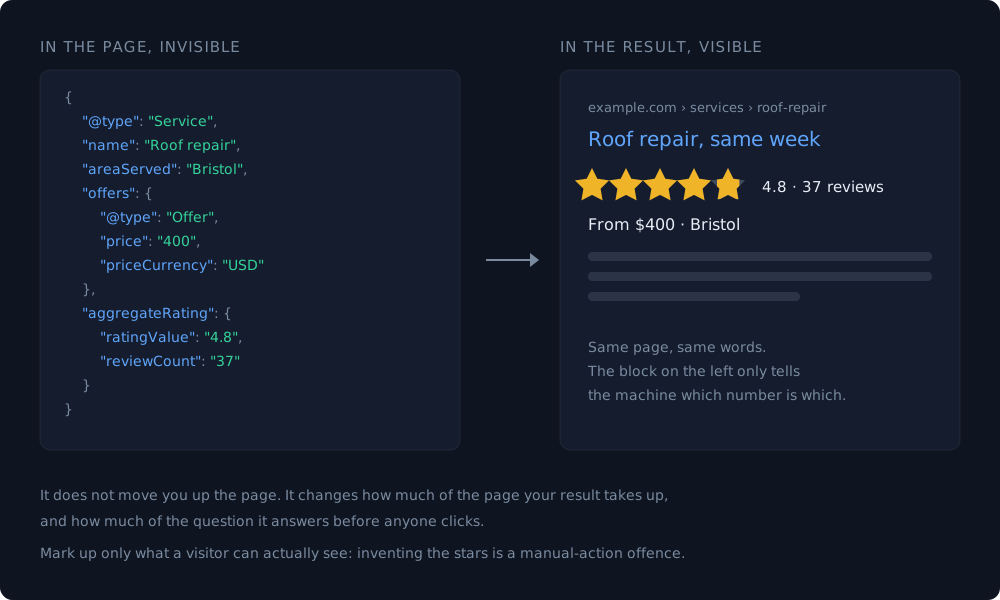
Structured data removes the guessing. It is a small block of machine-readable description, invisible to visitors, that says: this is a service, this is its price, this is the currency. Nothing more mystical than that.
What you actually get for it
Be careful with the promises here, because this is where most articles oversell.
- It is not a ranking boost. Adding markup does not move you up the results page by itself, and anyone claiming otherwise is selling something.
- It can change how your result looks — star ratings, FAQ dropdowns, prices, breadcrumbs, event dates. A result that takes up more space and answers more gets clicked more, and that is the real payoff.
- It helps machines understand the page — which now includes AI assistants summarising your business, not only the search engine.
So the honest framing: structured data does not make you rank better, it makes you understood correctly. Those are different things, and the second one is still worth an hour.
The types that matter for a small site
There are hundreds of schema types. You need three or four.
- Organization or LocalBusiness — who you are, where, opening hours, phone. The foundation; everything else attaches to it.
- Service or Product with an Offer — what you sell and for how much. This is the one that puts a price into the result.
- FAQPage — your questions and answers, if you genuinely have them on the page.
- BreadcrumbList — where the page sits in the site, which tidies up the address line under your result.
- Article — for blog posts, with author and date.
Use JSON-LD, a block of JSON in the page. It is the format search engines prefer and the only one you can add without touching your existing markup.
Product and Offer earn their keep on a shop, where price and stock status can appear in the result itself.
Ecommerce website: platform or custom build
The rule that gets sites penalised
Markup must describe what is actually on the page. Marking up reviews you do not display, prices you do not show, or an FAQ that exists only in the code is a manual-action offence, and the penalty removes your rich results entirely — usually right when they had started working.
The practical version of this rule: if a visitor cannot see it, do not mark it up.
How we did it on this site
The pricing section on the homepage lists five services with prices, terms and descriptions. The markup for it is generated from the same array that draws the cards — one source, two outputs.
That detail is the whole trick, and it is worth stealing. Hand-written markup drifts: someone raises a price on the page, forgets the JSON block, and now the site tells search engines something that is no longer true. When the numbers can only exist in one place, they cannot disagree. Ours also switches currency per language — roubles, dollars, reais — because the array carries all three.
Page speed: what the score means and what actually moves it
Checking it in five minutes
- Paste the page URL into the Rich Results Test to see whether Google can read your markup and which result types it qualifies for.
- Use the Schema Markup Validator for the syntax itself — it checks the vocabulary rather than what Google will display.
- Then read the block yourself and compare every value against the visible page. Tools catch broken syntax; only you catch a price that is quietly out of date.
- After launch, watch Search Console — it reports markup errors on pages it has crawled, which is the only place you will notice a change that broke something months later.
One evening of work, then it looks after itself — assuming you built it so it cannot drift.
What to read next
- Ecommerce website: platform or custom build Four ways to sell online with their true running costs, and the question that decides between them before you compare features.
- Do you actually need an admin panel? The feature everyone asks for by default — and half of them never open it twice.
- Page speed: what the score means and what actually moves it A real report from our own site, line by line — including the third of it that cannot be fixed at all.