Page speed: what the score means and what actually moves it
A real report from our own site, line by line — including the third of it that cannot be fixed at all.
Almost everyone meets page speed the same way: you run your site through Google PageSpeed Insights, get a number under 60, and a list of warnings you do not understand. The number feels like a grade. It is not one — it is a simulation, and knowing what it simulates tells you which half of that list is worth your evening.
Two different measurements, one confusing screen
The report shows two things that people constantly mistake for each other.
- Lab data — a simulated load on a throttled mid-range phone, run once, right now. This is where the 0–100 score comes from. It is repeatable and it is fiction: no real visitor has exactly that device on exactly that connection.
- Field data — what actually happened to real Chrome users on your pages over the past 28 days, taken from the CrUX dataset. It only appears if your site has enough traffic. This is the data Google uses for ranking.
So a page can score 62 in the lab and still pass in the field, or score 95 and fail. If both are present, read the field data first and treat the score as a to-do list, not a verdict.
The three numbers that count
Core Web Vitals are three field metrics, and a page needs a good result on all three at the 75th percentile of real visits — meaning three out of four people must get that experience, not the average.
- LCP, Largest Contentful Paint — when the biggest thing on screen finishes rendering. Good is under 2.5 seconds. This is usually the hero image or the first block of text.
- INP, Interaction to Next Paint — how long the page takes to visually respond after a tap or click. Good is under 200 milliseconds. It replaced First Input Delay in March 2024, and it is stricter: it looks at every interaction, not just the first.
- CLS, Cumulative Layout Shift — how much the layout jumps while loading. Good is under 0.1. Nearly always caused by images without width and height, or by fonts and banners loading late.
What our own report looked like
Numbers from a real audit of this site, August 2026, five pages checked. Mobile scores were 77 to 82; the same pages on desktop scored 94. That gap is normal and it is the whole point: mobile is throttled on purpose, because that is closer to how people actually browse.
The interesting part was the breakdown. Time to first byte was 0–120 milliseconds — the server was never the problem. But the render delay was 860 to 2,340 milliseconds. In other words the page arrived almost instantly and then sat there waiting for stylesheets and fonts before it could show anything at all.
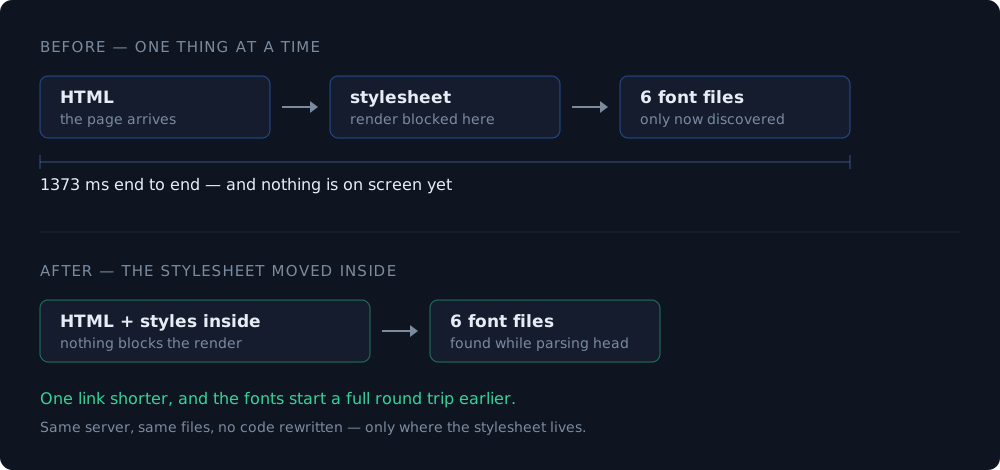
The largest element was not a photo. It was a paragraph in the header — which means the page was blocked by the request chain: HTML, then the stylesheet, then six font files, 1,373 milliseconds end to end. On one page the LCP reached 4.5 seconds, past the threshold where Google stops calling it "needs improvement" and calls it poor.
The fix was one change: putting the stylesheet inline in the document instead of linking it. That removed the only render-blocking request, and the fonts started downloading a full round trip earlier, because the browser meets the font declarations while it is still parsing the head. No code was rewritten, nothing was minified, no plugin was installed.
The third of the report you cannot fix
This is the part no speed guide mentions, and it saves the most time. In our audit, three of the biggest warnings belonged to code we do not own:
- "Reduce unused JavaScript, 99 KB" — that is the analytics tags: Google Analytics at 141 KB and the Yandex counter at 86 KB. They go away only if the counters go away, and with them the conversion tracking.
- "Use efficient cache lifetimes, 70 KB" — the counter script is served by someone else's server with a one-hour cache header. We cannot change a header we do not send.
- Long main-thread tasks — again, inside those same two scripts.
The practical rule: before you spend a night on a warning, check whose file it points at. If the URL is not on your domain, the only lever you have is removing the third party entirely, and that is a business decision, not a performance one.
What actually moves the number
In order of how much they usually pay back, for a normal small site.
- Images. Almost always the largest bytes on the page and the easiest win — right format, right dimensions, and explicit width and height so nothing jumps.
- Render-blocking CSS. One stylesheet in the head can hold the entire page hostage, as it did on ours.
- Fonts. Every custom weight is another file. Two weights are usually enough; the rest is decoration people never notice.
- Third-party scripts. Chat widgets, pixels, counters. Each one costs real milliseconds — keep the ones you actually read reports from.
- Sizes reserved for anything that loads late: images, embeds, banners. This is the entire CLS fix in one line.
Image optimization: formats, sizes and the settings that matter
How to work through your own report
- Run the page on mobile, not desktop. Desktop flatters you.
- Read field data first if it exists; the score is a hint, not a grade.
- Find the LCP element the report names, and ask why that specific thing is slow to appear.
- Sort the remaining items by which files they blame, and drop everything hosted by someone else.
- Fix one thing, measure again. Two changes at once and you learn nothing about either.
A last piece of perspective: speed is a ranking factor, but a weak one compared to actually answering the visitor's question. A fast page with nothing to say still loses. Fix the obvious 80 percent, then go back to the content.
WCAG for normal websites: what it means in practice
Build a landing page free — the generated code ships without extra scripts
What to read next
- Image optimization: formats, sizes and the settings that matter Images are usually 60 to 80 percent of a page's weight, and almost all of it is avoidable.
- Responsive design: what it means and what it does not More than half your visitors are on a phone. Here is what that requires of the layout — and what it does not.
- WCAG for normal websites: what it means in practice Six fixes cover most of it, and five of them take an afternoon.