Image optimization: formats, sizes and the settings that matter
Images are usually 60 to 80 percent of a page's weight, and almost all of it is avoidable.
On a typical small business site, images are the heaviest thing by a wide margin — often more than everything else combined. That also makes them the cheapest thing to fix: no rebuild, no framework, no developer. Four decisions do nearly all the work.
Decision one: the format
- WebP — the sane default in 2026. Every browser in current use supports it, and it is roughly 25 to 35 percent smaller than JPEG at the same visual quality.
- AVIF — smaller still, sometimes dramatically, but slower to encode and occasionally awkward in older tooling. Worth it for photo-heavy sites; overkill for a landing page with six images.
- JPEG — the safe fallback. Still fine if your workflow cannot produce anything else.
- PNG — only for images that need real transparency or hard edges, like logos and screenshots of interfaces. Never for photographs: a PNG photo can be five times the size of the same WebP.
- SVG — for icons and logos. It is text, it scales to any size, and it usually weighs less than a favicon.
One caveat that costs people hours: converting an already-compressed JPEG to WebP does not recover quality that was thrown away earlier. Convert from the original whenever you have it.
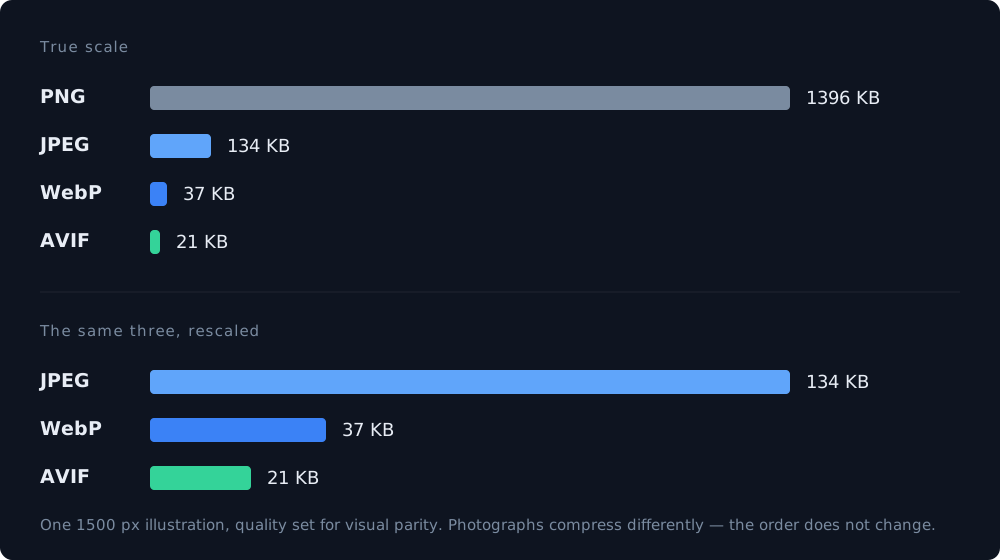
Those are real numbers from the images on this site, not a benchmark. They also show why the ranges in guides vary so much: this is a dark 3D render with large flat areas, which is the worst case for JPEG and the best case for WebP. On an ordinary photograph the gap between JPEG and WebP narrows to the 25–35 percent quoted above. What does not change is the order, or the verdict on PNG.
Decision two: the actual pixel size
The most common and most expensive mistake is uploading the photo straight off the camera — 4000 pixels wide — into a slot that displays it at 600. The browser downloads all four thousand pixels and then throws three quarters of them away.
Export at roughly the size the image is displayed, then double it for high-density screens. A 600-pixel slot wants a 1200-pixel file, not a 4000-pixel one. That single change routinely removes more weight than every other optimization put together.
Decision three: width and height in the markup
This one does not save a single byte, and it is still the most valuable line in this article. Without explicit dimensions, the browser does not know how much room to reserve, so the text renders, the image arrives, and everything below it jumps down the page. That jump is Cumulative Layout Shift, one of the three metrics Google measures, and it is also the reason people tap the wrong button.
Set width and height attributes — or an aspect-ratio in CSS — on every image, including the ones in your header and footer. Modern browsers use them to hold the space open before a single byte of the image has arrived.
Page speed: what the score means and what actually moves it
Decision four: what loads now and what loads later
The image at the top of the page — the one visitors see immediately — should load as early as possible. Everything below the fold should wait until the visitor scrolls toward it.
- Add loading="lazy" to images below the fold. One attribute, supported everywhere.
- Do NOT lazy-load the hero image. It is usually the element the LCP metric measures, and delaying it is the single easiest way to make your score worse while believing you improved it.
- For the hero, the opposite helps: fetchpriority="high" tells the browser to fetch it before the rest.
What this looks like in practice
On this site every generated page ships its images as WebP, at the dimensions they are actually displayed, with the width and height recorded alongside them so the markup can always state them. The result is unglamorous and exactly what you want: on the pages we audited, images stopped appearing in the report at all. The remaining problems were stylesheets, fonts and third-party analytics — never the photos.
That is the real goal here. Image optimization is not about chasing the last kilobyte; it is about getting images out of the list of things that slow your site down, so you can spend attention on the parts that are harder to fix.
A five-minute checklist
- No image file larger than about 200 KB, and no photograph as PNG.
- Nothing exported wider than twice its display width.
- Every image has width and height, or an aspect ratio in CSS.
- Below-the-fold images are lazy; the hero image is not.
- Icons and logos are SVG where possible.
- Alt text describes the image for people who cannot see it — required for accessibility, and it is also the only thing search engines can read inside a picture.
What to read next
- Page speed: what the score means and what actually moves it A real report from our own site, line by line — including the third of it that cannot be fixed at all.
- Responsive design: what it means and what it does not More than half your visitors are on a phone. Here is what that requires of the layout — and what it does not.
- WCAG for normal websites: what it means in practice Six fixes cover most of it, and five of them take an afternoon.